Scheduling a Post
A productive Friday, or: you live and learn…
Not many people know (or, to put it another way, many people do not) that, according to LinkedIn statistics, posts published on weekdays between 8 and 10 a.m. in the target audience’s time zone gain the most traction.
Another LinkedIn statistic: to grow on the platform, you need to post regularly. Posting 3–4 times a week is considered optimal for growth.
Some people find it very difficult to pull themselves together in the morning and put something creative out into the world. Sometimes it is simply physically impossible. LinkedIn has a scheduled-posting feature for just such people. You write a post, but instead of publishing it straight away, you set the date and time when it should go live. LinkedIn will publish it automatically on the specified date and at the specified time.
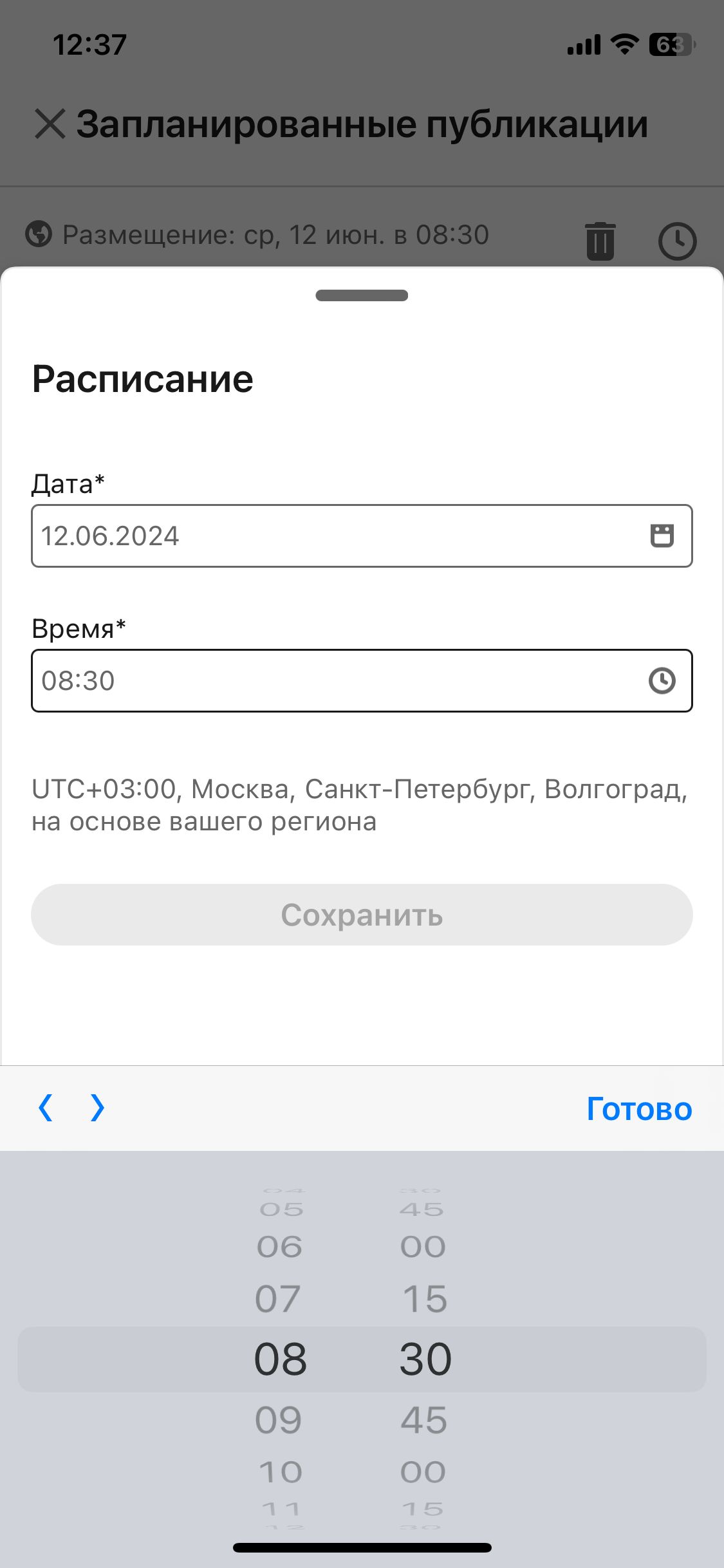
There is, however, one small annoyance with the time intervals: in the browser, the time can only be set in 30-minute increments. That leaves relatively few options within the prime window: 8:00, 8:30, 9:00, 9:30 and 10:00.
It turns out there is a way around this.
Here is the trick:
- Schedule a post in the browser (I imagine that most good posts are written at a desk);
- Open the LinkedIn mobile app;
- Go to the scheduled posts section;
- Tap the edit icon for the scheduled post whose publication time you want to adjust;
- The editor opens and lets you set the time in 15-minute rather than 30-minute increments.
Screenshot proof attached.
Have a great weekend, everyone! And from Monday onwards, we expect to see quality posts that do not all go live at the same time as everyone else’s!